
Use this page to check Sindh Police e-challans, download duplicate slips, and learn how to pay via JazzCash, Easypaisa, bank app, ATM, or branch. Clear steps, screenshots you can add later, and a quick tool to jump to the official portal.
سندھ ای چالان آن لائن معلومات
یہ صفحہ آپ کی مدد کے لیے تیار کیا گیا ہے تاکہ آپ ای چالان چیک کریں، ڈاؤن لوڈ کریں اور ادائیگی کے طریقے سمجھیں۔
Fast Track: Check Your E-Challan Status
Enter your vehicle number and CNIC, then select “Go to Official Portal”. You will be redirected to the Sindh Police or Excise portal to view your actual record. Prefer a full guide? Read how to check e-challan by vehicle number or verify by CNIC. Vehicle Number CNIC (optional) Go to Official Portal
Note: We do not store data. You will search on the official government website.
Contents
- What is an E-Challan
- Why Sindh Uses E-Challans
- Key Benefits
- How the System Works
- How to Check Your E-Challan
- How to Pay Your E-Challan
- Traffic Violations and Fine Ranges
- E-Challan in Major Sindh Cities
- FAQs
What is an E-Challan
An e-challan is a digital traffic fine issued when a violation is recorded by traffic police or cameras. Your vehicle and owner data are matched, a ticket is created, and you can view and pay it online without visiting an office. Learn more in our E-Challan FAQs.
Why Sindh Uses E-Challans
- Transparency and audit trail
- Faster processing, fewer manual errors
- Anytime online access for checking and paying
- Better enforcement through central databases
Key Benefits
- Check from home
- Multiple payment options
- Download and re-print slips
- Keep records for insurance or compliance
How the System Works
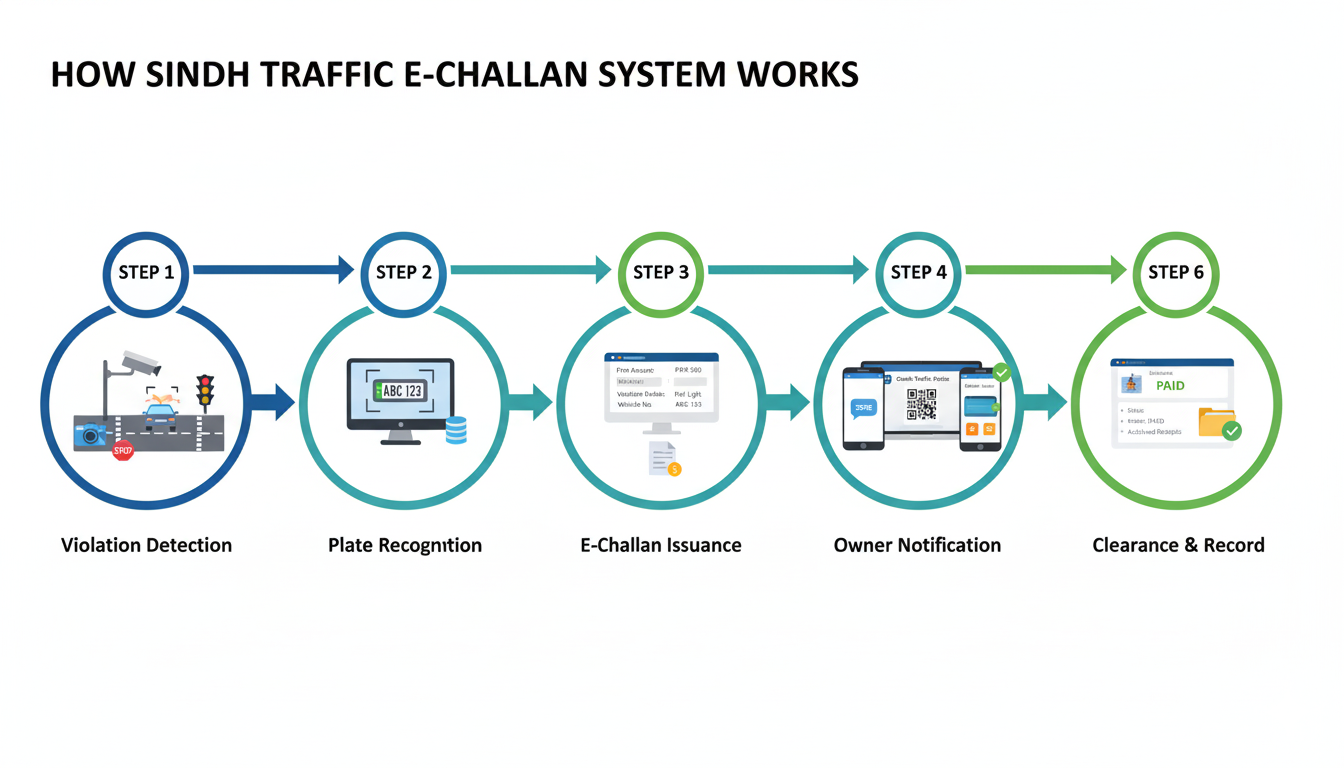
1) Violation detection
Traffic unit or automated cameras record a violation with time and location.
2) Plate recognition and matching
Vehicle number is read and matched with registration owner in the provincial database.
3) E-challan issuance
A digital challan is created with violation details and fine amount.
4) Owner notification
Owner can be notified via SMS or can self-check online.
5) Online check and payment
Use the official portal or follow our checking guide, then pay via wallet, bank app, ATM, or branch.
6) Clearance and record
After payment, status updates to paid. Keep receipts and reference numbers for your record.
How to Check Your E-Challan
- Open the official portal (use the tool above) or see step-by-step vehicle number guide.
- Enter your Vehicle Number. If asked, also enter your CNIC or use the CNIC method.
- Submit to view all pending or paid challans linked to your vehicle.
- Click to download or print the challan slip.
Tip: If nothing shows, see e-challan not showing online.
How to Pay Your E-Challan
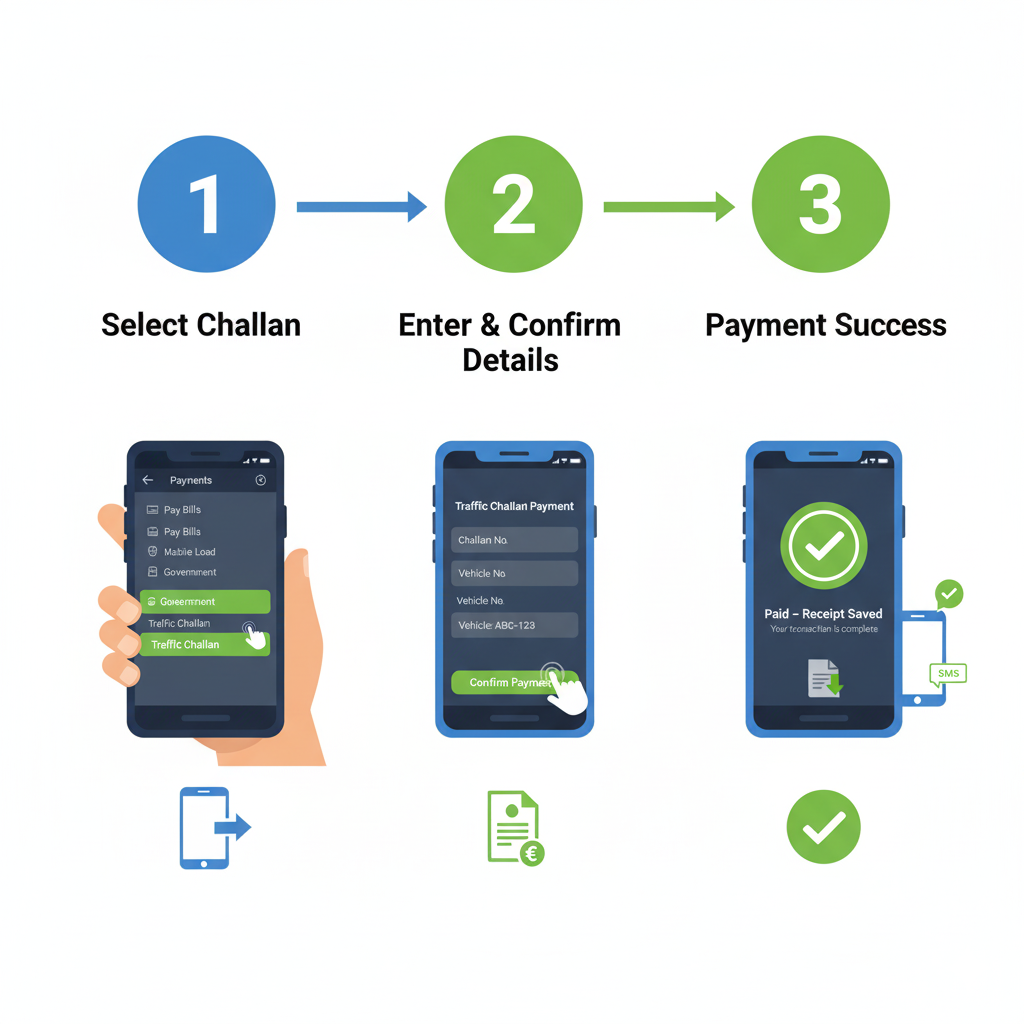
Pay via mobile wallet (JazzCash or Easypaisa)
- Open the wallet app and go to “Traffic Challan” or “Government Payments”.
- Enter your challan number or vehicle number.
- Confirm details and pay. Save the receipt or screenshot.
Full wallet steps: Pay e-challan with JazzCash or Easypaisa.
Pay via internet banking or ATM
- Open your bank app or visit an ATM.
- Find “Bill/Challan Payments”.
- Enter challan number, verify details, and pay.
Pay at a bank branch or traffic facilitation center
- Print the slip and visit a designated branch or center.
- Pay at the counter and keep the stamped receipt.
After payment: Status usually updates shortly. Keep the receipt until you see “Paid” on the portal.
Traffic Violations and Fine Ranges
| Violation | Motorcycle (Rs) | Car/Jeep (Rs) | PSV/Bus (Rs) | HTV/Truck (Rs) |
|---|---|---|---|---|
| Overspeeding | 5,000 | 15,000 | 20,000 | 20,000 |
| Wrong-way driving (one-way) | 25,000 | 100,000 | 100,000 | 100,000 |
| Driving without licence | 25,000 | 50,000 (up to) | 50,000 (up to) | 50,000 (up to) |
| Reckless / negligent driving | 25,000 | 25,000 | 25,000 | 25,000 |
| One-wheeling / drifting (motorcycle) | 100,000 (1st), 200,000 (2nd), 300,000 (3rd) | — | — | — |
Note: Government vehicles wrong-way fine = Rs 200,000.
E-Challan in Major Sindh Cities
The online process applies province-wide. Karachi e-challan system has broader camera coverage and app support; Hyderabad, Sukkur, Larkana and other cities use the same provincial databases and payment methods. Use the official portal regardless of your city.
Karachi users can also see our note on the Karachi e-challan mobile app.
FAQs
Can I check by CNIC?
Yes. Some portals allow CNIC with or without vehicle number. See verify e-challan using CNIC.
Nothing shows when I search. What now?
Verify your vehicle number format, try again later, try CNIC, or confirm registration details at the Excise office. If you are sure a challan exists, see e-challan not showing online.
Do I have to print the slip to pay?
Not for digital payments. For branch payments, a printed slip helps. For printing steps visit download or print duplicate challan slip.
What happens if I do not pay?
Late fees or enforcement actions may apply. Pay promptly and keep proof. Then confirm status under check e-challan.
How do I dispute a wrong e-challan?
Gather evidence (vehicle sale proof, photos, etc.) and follow the process in how to appeal or dispute a wrong e-challan.
See all questions on the dedicated E-Challan FAQ page.Useful Guides:
- Check e-challan by vehicle number
- Verify e-challan using CNIC
- Pay with JazzCash or Easypaisa
- Download or print duplicate slip
- E-challan not showing online
- Dispute a wrong e-challan
- Traffic violation fines in Sindh
- Karachi e-challan system
- Karachi e-challan mobile app
- E-Challan FAQ
Disclaimer: echallansindh.com is an informational website. We are not affiliated with government departments. We do not store user data. All e-challan lookups and payments happen on official portals.